Laboratory 01/02: Electric, Layout, Schematic and MOS Transistors
Jörg Vollrath
Static IV curves of NMOS and PMOS Transistors from schematic and layout are simulated for different technologies. Electric as design tool is used.
This practical training uses Electric for layout and schematic entry and LTSPICE for simulation. Electric is free software and needs minimal installation and maintenance. There is a standard cell library available muddlib07.jelib , an example for a MIPS processor muddlib07.jelib and operational amplifiers opamp.jelib
. It has many EDA tools built in, has a good tutorial and help system and needs minimum effort to start.
- Electric:
http://www.staticfreesoft.com/index.html
Copy with Portable Java - CMOS Circuit Design and Layout: http://www.cmosedu.com/
- LTSPICE:
http://www.linear.com/designtools/software/
Copy LTSPICE IV - David Harris, Harvey Mudd college: MIPS Design, https://globlib4u.wordpress.com/2013/01/26/e158-spring-2007-mips-project/
- David Harris, Harvey Mudd college: MIPS Design, http://www3.hmc.edu/~harris/
- MIPS 2007 http://www.staticfreesoft.com/contrib/muddChip.tar.gz
Electric
This section starts Electric (L:\apps\VLSIDesignSystem\VLSIDesignSystem.bat) and does some basic configuration.
You can either do it manually setting one option at a time or import electricPrefs.xml .
Start Electric by double clicking on the symbol on the desktop. Adjust the windows.
Select a white Background: Window- > Color Schemes - > White background color
Increase Memory: File->Preferences- > General- > General Memory
Maximum Memory 512 megabytes
Maximum permanent space 64 megabytes
Setup Technology:
File->Preferences->Technology->Technology mocmos Metal layers 3 Layers
File->Preferences->Technology->Scale 500 nanometer
Set LTSPICE path:
File->Preferences->Tools->SPICE
Spice engine Spice 3
Spice level: 3
Parasitics: Trans area/perim only
After writing deck: Run, Ignore Output
Run program: L:\apps\LTC\LTspiceIV\scad3.exe
!! Adjust this path to your directory structure !!
with args: -i ${FILENAME} -r ${FILENAME_NO_EXT}.raw -o ${FILENAME_NO_EXT}.out
!! SPACE between the options are needed.
check Use dir: your directory (c:\temp\Microelectronics\Laboratory\SPICE\)
check: Overwrite existing output file (no prompt)
Apply
Export: electricPrefs.xml to your group directory
Schematic and Layout of a MOS Transistor
This section shows how to simulate the output curve of a MOS Transistor.
Copy the files: cmosedu_models.txt and Lab01_1u_00.jelib to your personal directory.
Open the Library Lab01_1u_00.jelib.
Select in the Explorer Tab NFET_1u_IV{sch}.
Tools->Simulation(SPICE)->Write SPICE Deck. This starts LTSPICE. Watch the message window for errors.
If there is an error in LTSPICE delete the .OPTION line.
Error message: Can't find transistor model
Open cmosedu_models.txt in LTSPICE (type .txt *.*) and check model.
If the file cmosedu_models.txt does not exist, copy the file to this location.
Make sure the node names of the transistor match the node names of the voltage sources, otherwise you have floating nodes and no current will flow.
You have to hit the run button to start the SPICE simulation. A graphical window appears where you do a 'Add Trace' with the current I(VDS).
Change to a white background: Tools -> Color Preferences -> Waveform -> Background -> 255,255,255
Look at the output IV-curve of a MOSFET. X-Axis VDS, y axis IDS. Make a printout for your report.
Note down the IDS. Exchange the position of VDS and VGS voltage variations in the .dc statement and look at the transfer characteristic. Note down the threshold voltage. You can vary the source VWS to see a change in the threshold voltage.
Close LTSPICE.
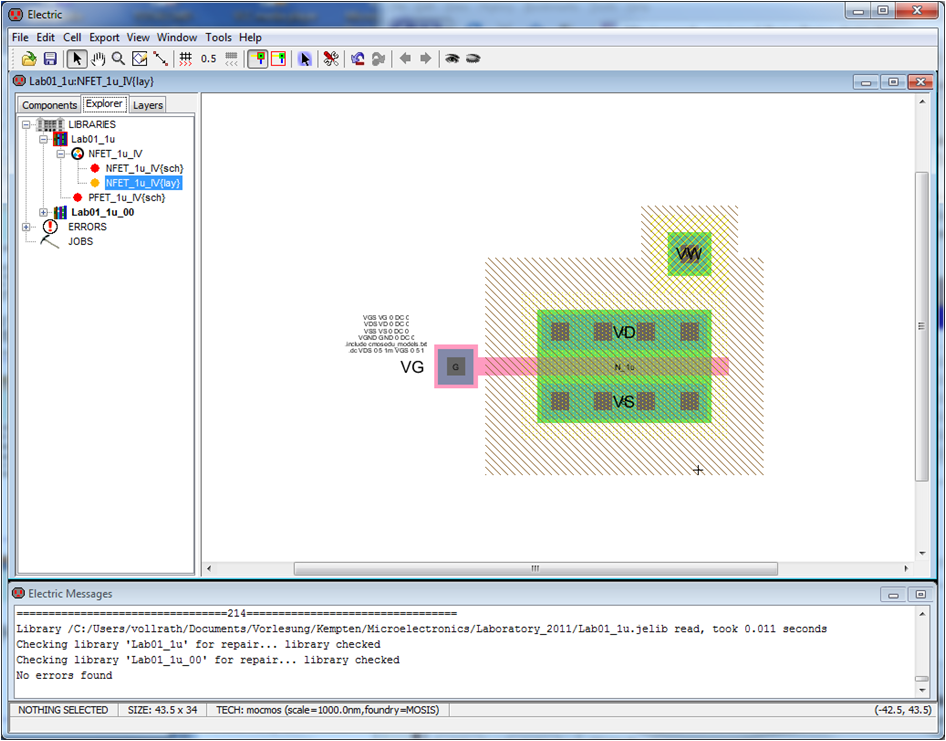
NMOS Transistor Layout
We will design the corresponding layout for the NFET transistor.
Cell->New Cell.. -> select layout, set name NFET_1u_IV same name as schematic.
Goto:
Components select nMOS Transistor and place it.
On the bottom of the screen you see a small text what kind of object you are selecting.
Size the transistor: Double click on the transistor to change width to 20.
Specify the transistor model: Tools -> Simulation (Spice) -> Set Spice Model -> N_1u
Holding down the <Strg> key lets you cycle through all possible selections.
Place the source drain contacts: select nACT and place a contact above the transistor and below the transistor. Resize the contacts to 20 by double clicking on them (Edit->Properties-> Object Properties)
Place a gate contact. Select 'Metal-1-Polysilicon Contact' to the left of the transistor.
Connect the contacts with the transistor: Select the contact. Press and hold the right mouse button and draw a connection to the transistor. If the wire gets to wide, Select the wire, double click and select at the end extension neither end.
Do a design rule check via Tools-> DRC-> Check Hierarchically (F5)
Name the wires: double click on the wires and name the connection G, D, S
Export the pins: Select the contacts, Export->Create Export, Export name VG, VD, VS, VW and set the characteristics to input or bidirectional.
Spice Code: Insert the SPICE code via Misc-> SPICE code or copy it from the schematic.
Simulate the output characteristics: Tools->Simulation(SPICE)-> write SPICE deck.
Make sure the node names of the transistor match the node names of the voltage sources, otherwise you have floating nodes and no current will flow.
Make sure to use the right transistor model: L, W of NFET PFET should match model name of NFET, PFET and model name in cmosedu_models.txt.
Layout versus Schematic and 3D View
To check the layout versus schematic use Tools->NCC-> Schematic and Layout Views
The checklist can be defined under Preferences->Tools->NCC
If a layout view is active a 3D view can be generated using Window->3D Window-> 3D View.
Output and Transfer curves for PFET
Select in the Explorer Tab PFET_1u_IV{sch}.
Tools->Simulation(SPICE)->Write SPICE Deck. This starts LTSPICE. Watch the message window for errors.
If there is an error in LTSPICE delete the .OPTION line. You have to hit the run button to start the SPICE simulation. A graphical window appears where you do a 'Add Trace' with the current I(Vds).
Look at the output IV-curve of a MOSFET. X-Axis VDS, y axis IDS. Make a printout for your report.
Note down IDS. Exchange the position of VDS and VGS voltage variations in the .dc statement and look at the transfer characteristic. Note the threshold voltage. You can vary the source VWS to see a change in the threshold voltage.
Make sure the node names of the transistor match the node names of the voltage sources, otherwise you have floating nodes and no current will flow.
A PFET has a pACT for Source and Drain and a n-well contact.
Make sure to use the right transistor model: L, W of NFET PFET should match model name of NFET, PFET and model name in cmosedu_models.txt.
Make a corresponding layout for the PFET.
Simulation of CMOS Transistors
A simulation of NFET and PFET transistors gives you the shown curves with points for transistor parameter extraction.
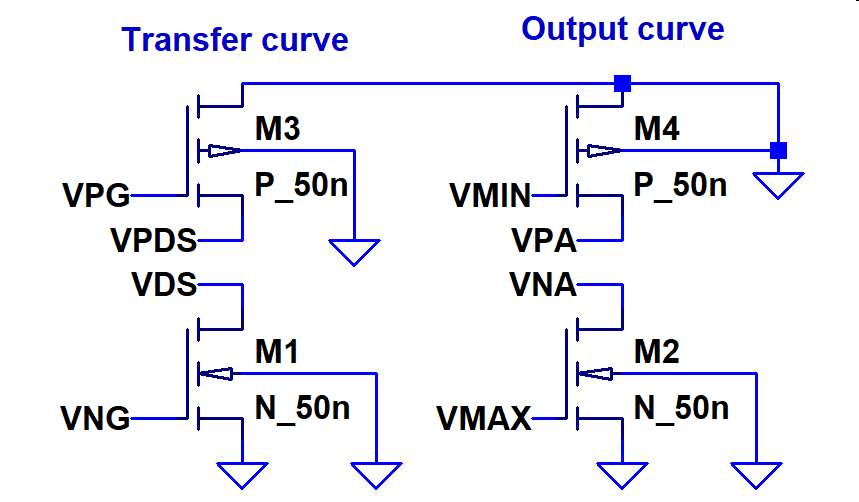 CMOS IV curve simulation schematic |
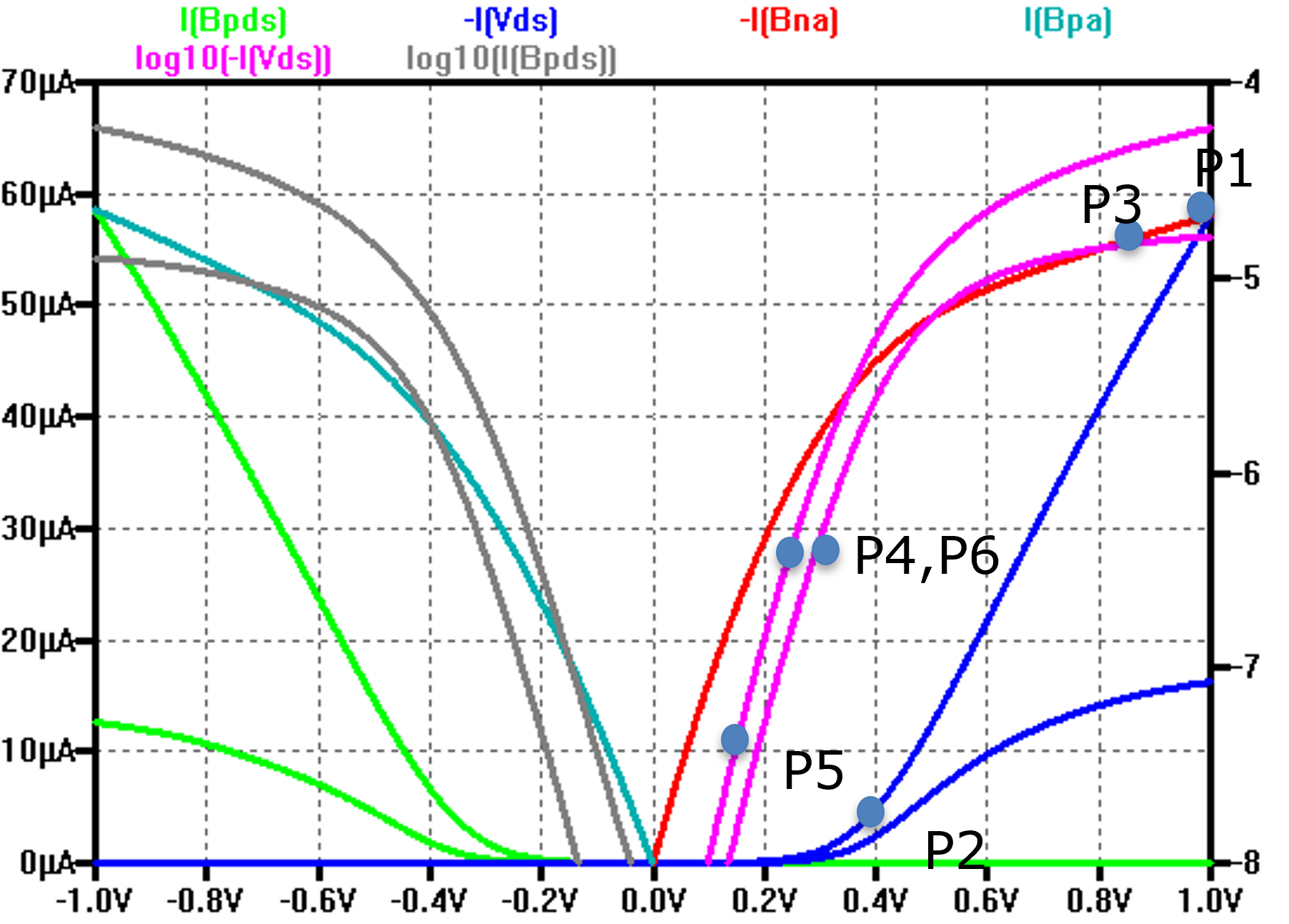 CMOS output and transfer curves |
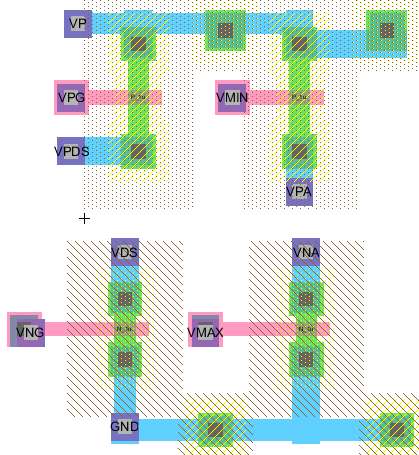 CMOS IV curve layout |
P1: IDSnmax=Ion P1,P2: Vthn, RDSnon (Kn) P1,P3: lambda P4,P5: SS (mV/dec), Ioff P4, P6: DIBL(mV/V) SS Substhreshold slope (mV/dec) DIBL Drain induced barrier lowering |
Voltage source and simulation SPICE directive:
* I(Bpds) 0.0-I(Vds) 0.0-I(Bna) I(Bpa) log10(- I(Vds)) log10( I(Bpds))
.param F = 100n Wx = 200n Wxp = 400n
.param Vmax = 5 Vmin=-1.0*Vmax V10=0.1*Vmax V90=0.9*Vmax
VP VP 0 DC 0
VG VG 0 DC 0
VDS VDS 0 DC 0
BPDS VPDS 0 V=-V(VDS)
BPGS VPG 0 V=MIN(V(VG),0)
BNGS VNG 0 V=MAx(V(VG),0)
BNA VNA 0 V=MAX(V(VG),0)
VNB VMAX 0 DC {VMAX}
VPB VMIN 0 DC {VMin}
BPA VPA 0 V=MIN(V(VG),0)
.include cmosedu_models.txt
.dc VG {VMin} {VMAX} 1m VDS {V10} {VMAX} {V90}
|
Measurement SPICE directive* Extract transistor parameters Vtn Rnon lambdan .measure DC INmax MAX -I(Vds) .measure DC Vnx when -I(Vds)=Inmax/10 .measure DC Vtn PARAM Vnx-0.1/0.9*(Vmax-Vnx) .measure DC Rnon PARAM (Vmax-Vtn)/INmax .measure DC Vnx2 when -I(Bna) = 0.9*Inmax .measure DC lambdan PARAM 0.1/0.9/(Vmax-Vnx2) * Extract transistor parameters DIBL SS * 0.7 Vtn gives low slope .measure DC Ix FIND -I(Vds) WHEN V(VG)=0.5*Vtn .measure DC Vnx3 when -I(Vds) = Ix/10 .measure DC SSn PARAM Vtn*0.5-Vnx3 * DIBL (Vnx3(step1) - Vnx3(step2))/0.9/Vmax .measure DC Vnx4 when -I(Vds) = 10n .measure DC Inoff PARAM Ix*(10**(-Vtn*0.5/SSn)) ** PFET Parameter .measure DC IPmax MAX I(Bpds) .measure DC Vpx when I(Bpds)=IPmax/10 .measure DC Vtp PARAM Vpx+0.1/0.9*(Vmax-Vpx) .measure DC Rpon PARAM (Vmax+Vtp)/IPmax .measure DC Vpx2 when I(Bpa) = 0.9*IPmax .measure DC lambdap PARAM 0.1/0.9/(Vmax+Vpx2) * Extract transistor parameters DIBL SS * perhaps 5*imin, 50*Imin?? Vtp/2 not working .measure DC Ipx FIND I(Bpds) WHEN V(VG)=0.7*Vtp .measure DC Vpx3 when I(Bpds) = Ipx/10 .measure DC SSp PARAM Vtp*0.7-Vpx3 * DIBL (Vpx3(step1) - Vpx4(step2))/0.9/Vmax .measure DC Ipoff PARAM Ipx*(10**(-Vtp*0.7/SSp)) .measure DC Vpx4 when I(Bpds) = 10n |
step 2 uses Vmax
Measurement: inmax
  step	MAX(-i(vds))	FROM	TO
     2	4.38333e-005	-1	1
Measurement: vtn
  step	vnx-0.1/0.9*(vmax-vnx)
     2	0.394527
Measurement: rnon
  step	(vmax-vtn)/inmax
     2	13813.1
Measurement: lambdan
  step	0.1/0.9/(vmax-vnx2)
     2	0.231407
Measurement: ssn
  step	vtn*0.5-vnx3
     2	0.0874887
Measurement: vnx4 (DIBL=vnx4(1)-vnx(2)
  step	-i(vds)=10n
     1	0.168166
     2	0.141613
Measurement: inoff
  step	ix*(10**(-vtn*0.5/ssn))
     2	2.34146e-010
|
Measurement: ipmax
  step	MAX(i(bpds))	FROM	TO
     2	3.82409e-005	-1	1
Measurement: vtp
  step	vpx+0.1/0.9*(vmax-vpx)
     2	-0.294143
Measurement: rpon
  step	(vmax+vtp)/ipmax
     2	18458.2
Measurement: lambdap
  step	0.1/0.9/(vmax+vpx2)
     2	0.242141
Measurement: ssp
  step	vtp*0.7-vpx3
     2	-0.1329
Measurement: vpx4 (DIBL=vpx41-Vpx2)
  step	i(bpds)=10n
     1	-0.151688
     2	-0.122891
Measurement: ipoff
  step	ipx*(10**(-vtp*0.7/ssp))
     2	9.78434e-009
|
| Technology | Simulation file | VDD | L=F, WN=2F, WP=4F | L=F, WN=4F, WP=8F | L=2F, WN=4F,WP=8F | L=2F, WN=2F,WP=4F | L=3F, WN=6F,WP=12F | L=2F, WN=6F,WP=12F |
| 1 µm | 1000nm_cmosedu_models.txt (3) | 5 V | ||||||
| 50 nm | 50nm_cmosedu_models.txt (54) | 1 V | ||||||
| 800 nm | 800nm_Holberg.txt (3) | 5 V | ||||||
| 500 nm | 500nm_Sedra.txt (1) | 3.3 V | ||||||
| 250 nm | 250nm_tsmc_level3.txt (3) | 3.3 V | ******38 BA NA | ******08 LK ok | *******28 MH FAIL | ******86 MN FAIL | ******11 BA ok | ******14 MV NA |
| 180 nm | 180nm_bulk.txt (bad) (49) | 3.3 V | ******80 ZJ ok | ******22 LG ok | *******35 TT NA | ******76 AM ok | ******60 SS ok | ******16 SJ ok |
| 180 nm | 180nm_tsmc.txt (49) | 3.3 V | ******08 RM NA | ******80 GD ok | *******38 LR ok | ******89 DM ok | ******11 JA NA | ******97 HL ok |
| 130 nm | 130nm_bulk.txt (49) | 2.5 V | ******98 DG ok | ******20 DI FAIL | *******83 VN NA | ******92 AA ok | ******23 KS NA | ******08 SB FAIL |
| 90 nm | 90nm_bulk.txt (49) | 1.8 V | ******13 GA ok | ******33 TG FAIL | *******96 JA ok | ******03 UM ok | ******36 SS FAIL | ******26 MT ok |
| 65 nm | 65nm_bulk.txt (54) | 1 V | ******83 AI NA | ******46 TK NA | *******08 KV FAIL | ******02 RM FAIL | ******06 AF NA | |
| 22 nm | 22nm_ptm.txt (54) | 0.9 V | ******26 SS ok | ******62 PV ok | *******11 SH ok | ******28 MM ok | ******22 PL ok | |
| 16 nm | 16nm_HP.pm.txt (54) | 0.7 V | ******39 PS FAIL | ******15 AM NA | *******28 IA ok | ******08 DM ok | ******44 MM NA |
Fail is mostly due to missing parameters Ion, Vth, Ron, λ, Ioff
[1] Transistor Models, Danial Chitnis, 25/03/2021, https://github.com/danchitnis/EEsim/blob/main/models.md
[2] Predictive Technology Model, Nanoscale Integration and Modeling (NIMO) Group, https://web.archive.org/web/20230608065842/http://ptm.asu.edu/
| VDD | 1 V | 1 V | 1 V | xx V |
| NFET | F=50n, L=F, WN=2F | F=50n, L=F, WN=4F | F=50n, L=2F, WN=4F | F=, L=xF, WN=xF |
| inmax = inon | 58uA | 121uA | 44uA | |
| vtn | 0.35V | 0.35V | 0.39V | |
| rnon | 11kOhm | 5.4kOhm | 13.8kOhm | |
| lambdan | 0.308/V | 0.308/V | 0.231/V | |
| ssn | 86mV/dec | 86mV/dec | 87mV/dec | |
| DIBLn | 37mV/V | 37mV/V | 27mV/V | |
| ioffn | 713pA | 1.5nA | 234pA | |
| PFET | F=50n, L=F, WP=4F | F=50n, L=F, WP=8F | F=50n, L=2F, WP=8F | F=, L=xF, WP=xF |
| Ipmax = Ipon | 53.6uA | 115uA | 38uA | |
| Vtp | -0.25V | -0.25V | -0.29V | |
| rpon | 14kOhm | 6.5kOhm | 18kOhm | |
| lambdap | 0.437/V | 0.428/V | 0.242/V | |
| ssp | mV/dec | mV/dec | 130mV/dec | |
| DIBLp | 68mV/V | 79mV/V | 29mV/V | |
| ipoff | 20.5nA | 44nA | 9.7nA |
Simulations for xx nm Technology
Use the layout cells of PFET and NFET to create a CMOS IV curve layout.
Tab Components, cell, NFET_1u_IV{layout} and place it.
Add the SPICE code for simulation and measurement.
Adjust F, Wx, Wxp and Vmax according to technology.
Change transistor names according to the table and the transistor model names.
.include the correct transistor model file.
Change the feature size: File, Preferences, Technology, Scale, to half F.
Simulate the IV curves and extract the transistor parameters from the SPICE Error Log.
For correct LTspice simulation check the LTSPICE .spi file
.SUBCKT NFET_1u VD VG VS VW
Mnmos@0 VS VG VD VW N_1u L=1U W=2U AS=26P AD=26P PS=26U PD=26U

.SUBCKT PFET_1u VB VD VG gnd
Mpmos@0 VD VG gnd VB P_1u L=1U W=2U AS=7.25P AD=7.25P PS=11U PD=11U

*** TOP LEVEL CELL: CMOS_1u_IV{lay}
XNFET_1u@0 VDS VNG gnd gnd NFET_1u
XPFET_1u@1 gnd VPA VMIN gnd PFET_1u
* Make sure that the top level cell nodes are passsed down to the
correct transistor terminals:XPFET_1u@1 gnd VPA VMIN gnd are mapped to .SUBCKT PFET_1u VB VD VG gnd and then connected to Mpmos@0 VD VG gnd VB ..
* Make sure all transistors have the coorect size L=.. W=..
* Pick the correct measurement values from step 2 (high VDS) as shown in the I-V curve picture with P1..P5 except for DIBL parameter where you calculate with values from step 1 and step 2.
Report
Example: Documentation format
It should be one page with results and text and one page only containing your picture and background.
The report should include
1) Your experience during the practical training.
What obstacles did you experience how did you solve them?
Please work in groups. You should also note down times you spent for each task.
2) Screenshot of combined IV curves of NFET and PFET in xx nm with readable text.
The log10 y axis should go from -9 to -2 with 1 step size.
3) Layout of the NFET and PFET simulation circuit.
4) A transistor parameter table.
Please send your electronic report as pdf including your name and lab number to joerg.vollrath@hs-kempten.de.
The filename should be <year>_Lab01_<Name>.pdf until 11.5.2026.
You can use PDFCreator as printer for creating pdf files via the print menue in Windows.
Microelectronics
Laboratory 03/04